Implementing Headless Onboarding
This onboarding flow is only available to select white-label partners. Please reach out to your Stream representative to understand if you are eligible.
Overview
This guide explains how to integrate with the Stream Partner API to enable third-party ordering capabilities. The integration flow consists of several key steps:
- Authentication
- Organization Creation
- POS Integration
- Location Management
- DSP (Delivery Service Provider) Binding
- Menu Assignment (optional)
- Menu Publish (optional)
- Disconnect (optional)
1. Authentication
The API uses OAuth 2.0 for authentication. You'll need to obtain credentials first. Endpoint
// Authentication Request
POST /oauth/token
{
  "grant_type": "client_credentials",
  "client_id": "YOUR_API_KEY",
  "client_secret": "YOUR_API_SECRET",
  "scopes": ["onboarding"]
}

// Response
{
  "access_token": "...",
  "token_type": "bearer",
  "refresh_token": "...",
  "expires_in": 3600,
  "refresh_token_expires_in": 7200,
  "scopes": ["onboarding"]
}
2. Organization Creation
First step is creating an organization for your merchant: Endpoint
POST /onboarding/org
{
  "name": "Merchant Name",
  "provider_id": "YOUR_INTERNAL_ID",
  "user": {
    "email": "merchant@example.com",
    "first_name": "John",
    "last_name": "Doe"
  }
}

// Response
{
  "org_id": "...",
  "user_id": "..."
}
3. POS Integration Flow
3.1. Initialize Integration
Start the POS integration process: Endpoint
POST /onboarding/integrations
{
  "org_id": "ORG_ID",
  "source": "YOUR_POS_SYSTEM", // e.g., "toast"
  "type": "pos",
  "return_url": "YOUR_CALLBACK_URL"
}

// Response
{
  "onboarding": {
    "_id": "ONBOARDING_ID",
    "entry_url": "URL_TO_START_OAUTH", // Redirect user here if provided
    "status": "waiting_for_oauth"
  }
}
3.2. Manual Integration
For POS systems that don't support OAuth or require manual integration: Endpoint
- When initializing the integration, if no
entry_urlis provided in the response, proceed with manual integration - Obtain the integration code from your POS system (if you are a POS, this can likely be inferred)
- Submit the code to complete the integration:
PUT /onboarding/integrations/{ONBOARDING_ID}
{
  "code": "MANUAL_INTEGRATION_CODE"
}

// Response
{
  "onboarding": {
    "_id": "ONBOARDING_ID",
    "status": "active",
    "type": "pos",
    // ... other onboarding details
  }
}
This PUT endpoint is also used to complete a reconnect onboarding record. Reconnection itself is available only for OAuth integrations, not manual integrations.
3.3. OAuth Integration
For POS systems supporting OAuth: Endpoint
- Redirect the user to the
entry_urlprovided in the initialization response - Handle the OAuth callback at your
return_url - Exchange the OAuth code:
PUT /onboarding/integrations/{ONBOARDING_ID}
{
  "code": "OAUTH_CODE"
}
When ONBOARDING_ID came from a reconnect request, this endpoint refreshes the credentials on the existing integration in place, rather than creating a new integration, and returns the integration to active.
Flow: createOnboardingIntegration returns an entry_url; once the merchant is
redirected there, the integration sits in waiting_for_oauth. To activate it,
capture the OAuth code from your return_url callback and call
connectOnboardingIntegration (PUT /onboarding/integrations/{id} with
{"code": "..."}), which exchanges the code and activates the integration.
3.4. Reconnecting an Integration
If an OAuth integration's credentials expire or are revoked, the underlying integration enters needs_reconnection and stops working. You can re-run OAuth against that integration to refresh its credentials in place.
This flow requires an organization-scoped partner JWT, as used when initializing an integration. The path parameter is the existing integration ID, not an onboarding ID. The org_id, type, and return_url body fields are required. Do not send source; Stream derives it from the existing integration.
There is currently no Partner API endpoint for discovering integrations in needs_reconnection. You must determine that reconnection is required outside this API and retain the existing integration ID.
- Start the reconnect:
POST /onboarding/integrations/{INTEGRATION_ID}/reconnect
{
  "org_id": "ORG_ID",
  "type": "pos", // "pos" or "dsp"
  "return_url": "YOUR_CALLBACK_URL"
}

// Response
{
  "onboarding": {
    "_id": "ONBOARDING_ID",
    "status": "waiting_for_oauth",
    "entry_url": "URL_TO_RESTART_OAUTH",
    "integration_id": "INTEGRATION_ID",
    // ... other onboarding details
  }
}
- Retain the new
onboarding._id, then redirect the merchant toentry_url. - Handle the OAuth callback at your
return_url. - Complete the reconnect using the new onboarding ID:
PUT /onboarding/integrations/{ONBOARDING_ID}
{
  "code": "OAUTH_CODE"
}
The reconnect onboarding record moves from waiting_for_oauth to active. The existing integration is refreshed in place and returns to active; no new integration is created.
For Simphony and other dynamic-credential POS integrations, Stream assembles entry_url from credentials stored on the existing integration. A Simphony entry_url does not include the onboarding context or return_url, so you must retain the onboarding._id returned by the reconnect request to complete the flow.
Reconnection limitations
- Reconnection is available only for OAuth integrations. Non-OAuth or API-key POS integrations, and providers that disable reconnection, return a
400response. - Reauthorization must use the same provider account as the existing integration.
- The
typemust match the integration source (posordsp). - Reconnection does not currently provide a discovery endpoint for integration-level
needs_reconnectionstatus.
Reconnection errors
400 Cannot create integration with user token: the token is not organization-scoped.400 User organization not foundor400 Merchant not found: the requested organization or its merchant could not be resolved.403 Integration not found or access denied: the integration does not exist or is not owned by the merchant. These cases are deliberately indistinguishable.400 {source} is not a POS integrationor400 {source} is not a DSP integration:typedoes not match the existing integration's source.400 {source} does not support reconnection: the provider does not support this reconnect flow.400 Integration is missing required metadata to build auth URIor400 Failed to assemble credentials: Stream could not construct the OAuth URL for a dynamic-credential POS integration.
4. Location Management
4.1. Fetch POS Locations
After integration, get available locations: Endpoint
GET /onboarding/locations?onboarding_id=ONBOARDING_ID

// Response
{
  "locations": [
    {
      "provider_id": "POS_LOCATION_ID",
      "name": "Location Name",
      "address": {
        "address_line_1": "123 Main St",
        "postal_code": "12345",
        "locality": "City",
        "administrative_district_level_1": "State",
        "country": "US"
      },
      "source": "pos_system_name"
    }
  ]
}
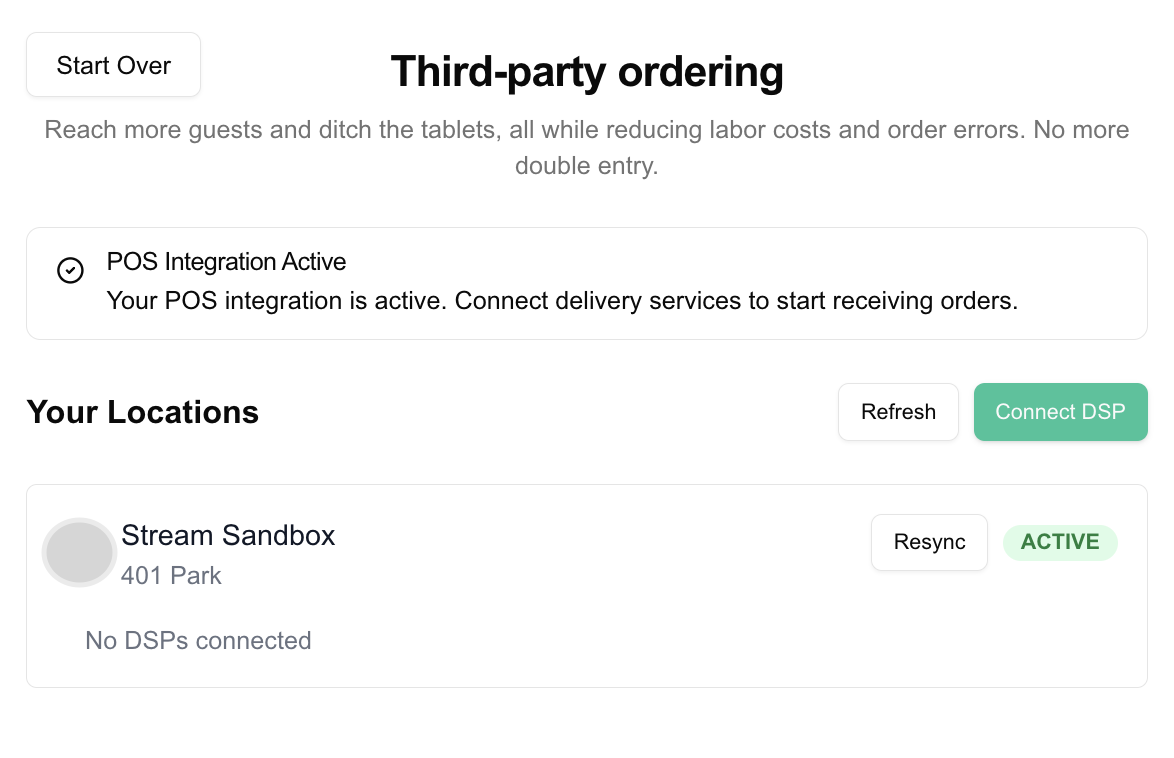
4.2. Ingest Selected Locations
Import selected locations: Endpoint
This endpoint imports selected locations and their menu data from the POS system. The data stays synced via POS webhooks after initial import. You can re-sync anytime by calling this endpoint again.
POST /onboarding/locations/ingest
{
  "onboarding_id": "ONBOARDING_ID",
  "locations": [
    {
      "provider_id": "POS_LOCATION_ID"
    }
  ]
}
5. DSP Integration
5.1. Start DSP Integration
Similar to POS integration but with type "dsp": Endpoint
POST /onboarding/integrations
{
  "org_id": "ORG_ID",
  "source": "DSP_NAME",
  "type": "dsp",
  "return_url": "YOUR_CALLBACK_URL"
}
5.2. Manual DSP Integration
Similar to manual POS integration: Endpoint
- Initialize the integration
- If no
entry_urlis provided, collect the DSP integration code - Submit the code using the same endpoint as OAuth integration
For an existing OAuth DSP integration, use Reconnecting an Integration. Completing the returned onboarding ID with this same PUT endpoint refreshes the existing integration in place.
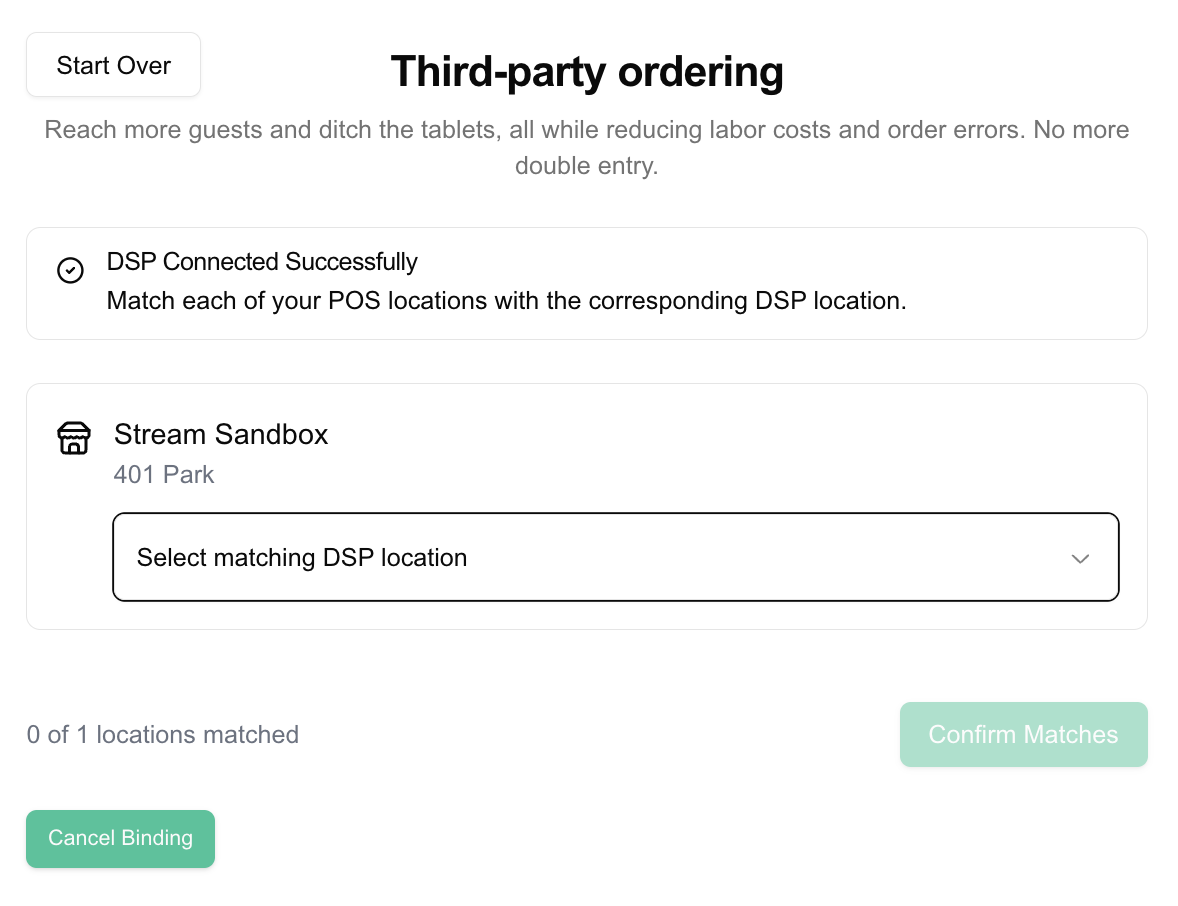
5.3. Bind DSP Locations
Connect POS locations with DSP locations: Endpoint
The binding process creates a link between locations that enables order flow. Getting this mapping wrong can result in misrouted orders.
Recommended UI flow:
- Display POS and DSP location details side-by-side for comparison
- Add confirmation step before saving
POST /onboarding/locations/bind
{
  "onboarding_id": "DSP_ONBOARDING_ID",
  "locations": [
    {
      "pos_location_id": "POS_LOCATION_ID",
      "dsp_provider_id": "DSP_LOCATION_ID",
      "dsp_store_name": "Store Name in DSP"
    }
  ]
}
6. View Organization Locations
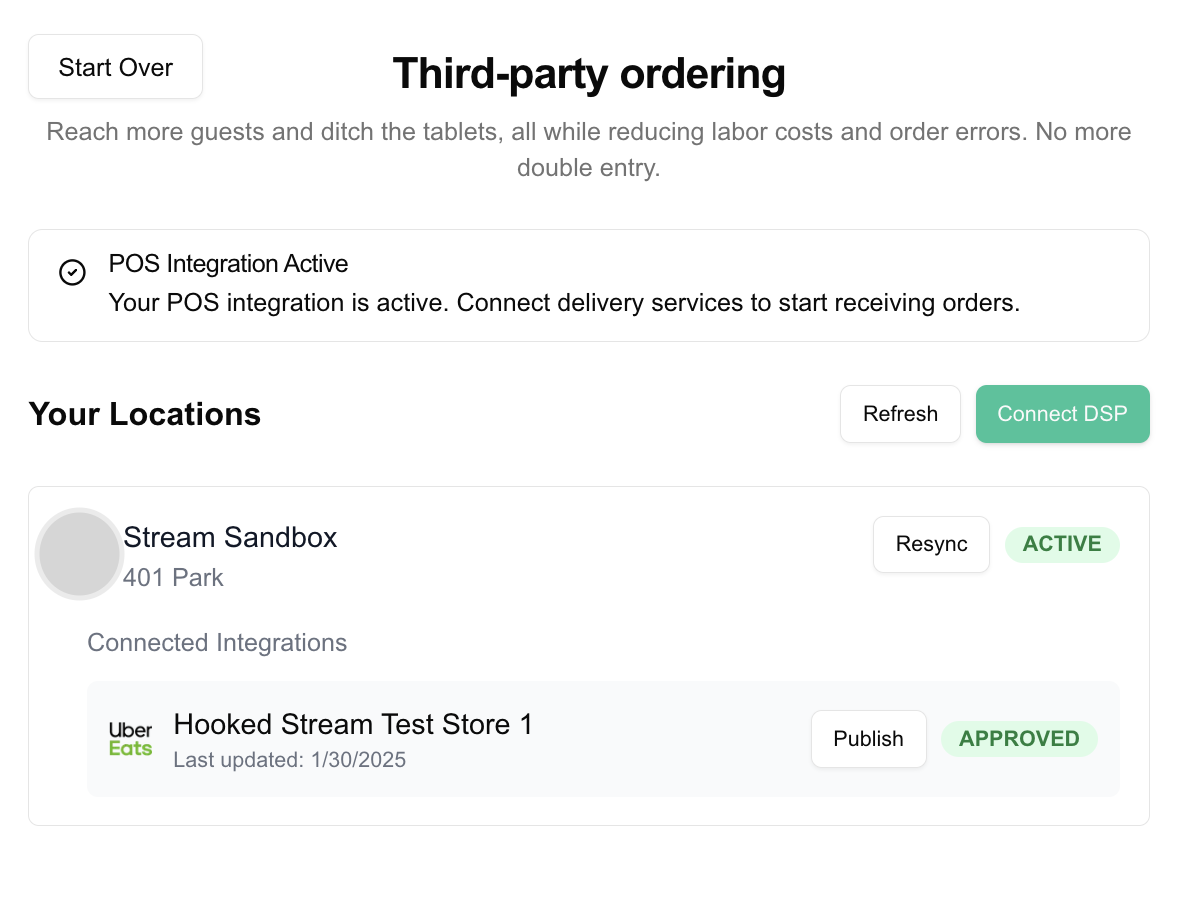
Get all locations for an organization:
This endpoint provides a way to view the current state of an organization and its locations. You can use it to verify active integrations and location statuses.
GET /onboarding/org/{ORG_ID}/locations

// Response
{
  "locations": [
    {
      "_id": "LOCATION_ID",
      "name": "Location Name",
      "source": "pos_system_name",
      "status": "active",
      "address": {
        // address details
      },
      "dsps": [
        {
          "_id": "DSP_CONNECTION_ID",
          "name": "DSP Name",
          "source": "dsp_name",
          "status": "APPROVED",
          "change_time": 1729555200000,
          "dsp_provider_id": "DSP_LOCATION_ID", // optional
          "integration_id": "INTEGRATION_ID" // optional
        }
      ]
    }
  ]
}
Each dsps[] entry is one DSP connection:
_idis the DSP connection ID.dsp_provider_idis the store's ID at the DSP, the value you sent when binding. Absent until the connection is bound.integration_idis the DSP integration the connection is bound through. For a DSP onboarding it matches the onboarding'sintegration_id, so you can see which connections a disconnect removes.
Connections removed by a disconnect drop out of dsps[].
7. Assign Menus to DSP Connections
By default, a catalog update publishes all of a location's menus to every DSP connection at that location. If a specific DSP connection should receive only specific menus, assign them explicitly. Endpoint
- Reference menus by the
provider_ids you supplied in your catalog. - Reference the DSP connection by its
DSP_CONNECTION_ID— thedsps[]._idreturned by View Organization Locations. - Each call is a full replace: it sets the complete list of menus for that connection. Send an empty
menu_provider_idsarray to remove the assignment and restore the default behaviour of publishing all menus.
On the next catalog update, the connection receives only its assigned menus. Connections with no assignment continue to receive all of the location's menus, so existing integrations are unaffected.
PUT /onboarding/menus/assignments
{
  "org_id": "ORG_ID",
  "dsp_location_id": "DSP_CONNECTION_ID",
  "menu_provider_ids": ["MENU_PROVIDER_ID_1", "MENU_PROVIDER_ID_2"]
}

// Response
{
  "dsp_location_id": "DSP_CONNECTION_ID",
  "menu_provider_ids": ["MENU_PROVIDER_ID_1", "MENU_PROVIDER_ID_2"]
}
8. Publish Menus to a DSP Connection
Menus publish automatically on catalog updates, so you don't need this call for normal operation. Use it to push menus to a DSP now: to retry a publish that failed, to apply a new menu assignment straight away, or after fixing a location that a publish rejected. It queues the same full menu publish that Stream's own dashboard triggers. Endpoint
location_idis the Stream location ID:locations[]._idfrom View Organization Locations, not the POSprovider_id.sourceis the DSP'ssourcevalue, as indsps[].source.- The location must have an
APPROVEDorpendingconnection to that DSP. Otherwise the call returns404and nothing is published. - The publish respects the connection's menu assignment, if it has one.
POST /onboarding/menus/publish
{
  "source": "doordash",
  "location_id": "LOCATION_ID"
}

// Response
{
  "status": "success",
  "publish_outcome": "queued"
}
A success response means the publish was queued, not that the menu has reached the DSP. The publish runs in the background. publish_outcome tells you what the call did:
publish_outcome | Meaning |
|---|---|
queued | A new publish was queued. |
expedited | A publish was already scheduled to run later. It now runs immediately instead. |
already_queued | A publish is already waiting to run. No second publish was queued. |
| Absent | The DSP takes a retail inventory rather than a menu (for example Uber Eats Retail). An inventory publish was queued. |
The call returns 400 without publishing when:
| Response message | Cause | What to do |
|---|---|---|
Publish job for location already in progress | A publish for this location and DSP is running now. | Wait for it to finish, then call again if you still need to. |
Please wait for menu publish to complete before retrying | The previous publish to this DSP has not finished yet. | Wait, then call again. |
Cannot publish <source> without timezone / without phone_number | The DSP needs a field the location is missing. | Fix the location in the POS, re-ingest it, and call again. |
Cannot publish <source> without menu hours | None of the location's menus have valid hours. | Add menu hours in the POS, re-ingest, and call again. |
Don't call publish in a loop to check if it worked. Each call queues or expedites another publish, and a call while one is running returns 400. A success response cannot tell you whether the DSP accepted the menu. If a menu is still missing on the DSP after the publish had time to run, contact Stream support.
9. Disconnect an Integration
Disconnect a merchant's POS or DSP integration: Endpoint
DELETE /onboarding/integrations/{ONBOARDING_ID}

// Response: the onboarding record
{
  "_id": "ONBOARDING_ID",
  "status": "deprovisioned", // or "waiting_for_deprovision"
  "integration_id": "INTEGRATION_ID",
  // ... other onboarding details
}
This disconnects every location on the integration, not one. There is no way to unbind a single location through this endpoint. Check what will be removed with View Organization Locations first.
What a disconnect removes:
- DSP onboarding: every DSP connection bound through the integration.
- POS onboarding: every POS location on the integration, and every DSP connection under those locations, whichever DSP integration it was bound through.
The response is the onboarding record with its new status:
| Status | Meaning |
|---|---|
deprovisioned | Every connection was removed. |
waiting_for_deprovision | At least one connection must be removed manually by Stream. Connections that don't need Stream were removed. |
Repeat calls
Calling DELETE again on the same onboarding is safe. Wait for one call to return before making the next.
- While any connection still waits for Stream, the call returns the record unchanged and does not file a new request.
- The status does not change on its own when Stream finishes. Call
DELETEagain: once every connection is removed, the record moves todeprovisioned. - A call on a
deprovisionedonboarding returns it unchanged. - Connections restored in the meantime, by a new onboarding for the same account or by Stream cancelling the request, are left alone.
A disconnected onboarding (waiting_for_deprovision or deprovisioned) cannot be reconnected or bound again. PUT /onboarding/integrations/{id}, ingest, and bind return 400 for it. To connect the merchant again, start a new onboarding.
Errors
| Status | Cause |
|---|---|
400 | The token is a user token, the onboarding has no connected integration, or a bound DSP connection cannot be removed yet (for example its onboarding at the DSP is still in progress). |
403 | The token lacks the onboarding scope. |
404 | The onboarding does not exist or belongs to another partner. |
Integration Status Flow
These statuses belong to the onboarding record:
- pending: Initial state for non-oAuth onboardings
- waiting_for_oauth: During OAuth flow
- active: Successfully connected
- waiting_for_deprovision: Disconnect requested; a connection needs a manual deprovision by Stream. Call disconnect again after Stream finishes to move it to
deprovisioned - deprovisioned: Integration has been disconnected
For OAuth-type integrations, status is waiting_for_oauth immediately after
creation (createOnboardingIntegration), until connectOnboardingIntegration
exchanges the OAuth code and moves it to active.
A reconnect creates a new onboarding record that moves from waiting_for_oauth to active.
The underlying integration is a different object with its own status. If its OAuth credentials expire or are revoked, that integration enters needs_reconnection and stops working until reconnection succeeds, when it returns to active. Headless partners cannot currently observe needs_reconnection through the Partner API, so it is not part of the onboarding-record status flow above.
Go Deeper
The steps above get a location bound. These guides cover what happens after bind, which is where most headless integrations get stuck:
| Guide | Read it when |
|---|---|
| Flow at a Glance | You want the whole flow on one diagram, with every API call in order. |
| Activation by DSP | You need to know whether a DSP goes live at bind, after a DSP review, or only with Stream's help. |
| DSP Connection Statuses | You are reading status from the bind response or dsps[].status and need to know what each value means. |
| Tracking Activation | A bind returned pending and you need to know when it goes live. |
| Troubleshooting | A bind was rejected, a connection is stuck, or a menu is not reaching the DSP. |