Activation by DSP
Every DSP uses the same bind call, but what happens after it depends on the DSP. Some DSPs are live in the bind response. Some activate later, after their own review. A few need Stream's team to finish the job.
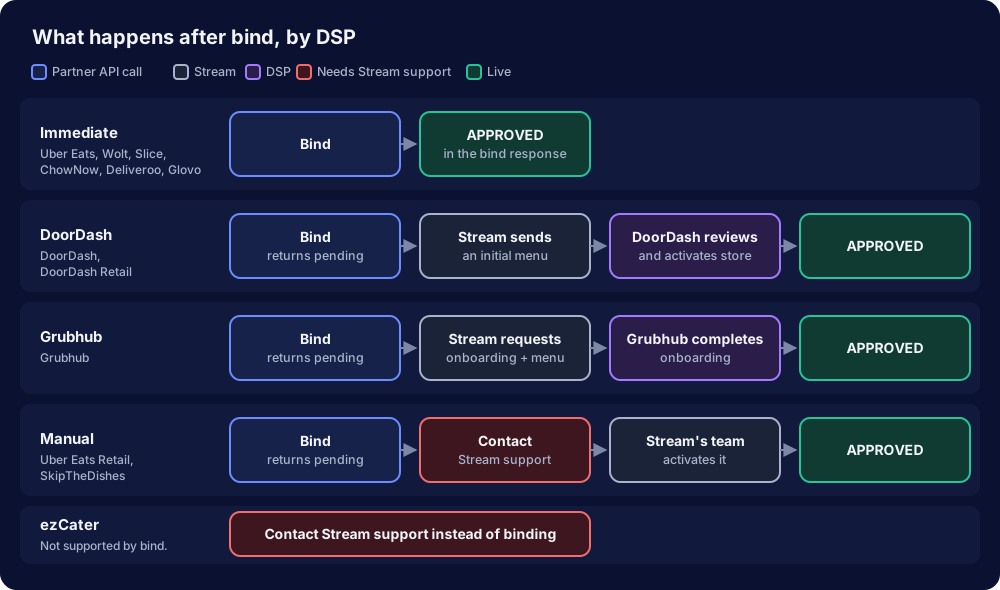
Summary
| DSP | Status after bind | Becomes APPROVED when | Fully headless today? |
|---|---|---|---|
| Uber Eats, Wolt, Slice, ChowNow, Deliveroo, Glovo | APPROVED | In the bind response itself | Yes |
| DoorDash, DoorDash Retail | pending | DoorDash reviews and activates the store | Yes, but you must poll for the status |
| Grubhub | pending | Grubhub reports onboarding complete | Yes, but you must poll for the status |
| Uber Eats Retail, SkipTheDishes | pending | Stream's team activates the location | No: contact Stream support after bind |
| ezCater | Not supported by bind | Stream's team sets up the location with ezCater | No: contact Stream support instead of binding |
Use the source value from GET /onboarding/integrations/dsp-options or dsps[].source to tell which DSP a connection belongs to.
Each path in detail
- Immediate
- DoorDash
- Grubhub
- Manual activation
- ezCater
Uber Eats, Wolt, Slice, ChowNow, Deliveroo, Glovo
- You call bind.
- The bind response returns the connection with
status: "APPROVED". - Menus publish to the DSP on the next catalog update.
What you do: Nothing more. Confirm status in the bind response is APPROVED.
On DSPs that review stores themselves, such as Uber Eats, Deliveroo, and Wolt, an APPROVED connection can still be waiting on the DSP's own review before the store appears on their marketplace. That review happens on the DSP's side and does not change the status in Stream.
DoorDash, DoorDash Retail
- You call bind. Stream checks that the location's catalog is complete enough for DoorDash.
- The bind response returns the connection with
status: "pending". - Stream sends DoorDash an initial menu so DoorDash can create the store.
- DoorDash reviews the store and confirms activation.
- The connection changes to
APPROVED, and the full menu publishes.
What you do: Poll the connection until it is APPROVED. See Tracking Activation.
Binding a DoorDash location with an incomplete catalog fails with 400. Before you bind, make sure the ingested location has a timezone and a phone number, and that its menus have hours. If any are missing, bind returns 400 and no connection is created. The response body is the only record of the reason, so log it.
Grubhub
- You call bind.
- The bind response returns the connection with
status: "pending". - Stream requests onboarding from Grubhub and publishes the full menu shortly after.
- Stream checks the onboarding status with Grubhub regularly.
- When Grubhub reports onboarding complete, the connection changes to
APPROVED.
What you do: Poll the connection until it is APPROVED. See Tracking Activation.
Uber Eats Retail, SkipTheDishes
- You call bind.
- The bind response returns the connection with
status: "pending". - Nothing changes the status automatically. Stream's team activates the location.
- The connection changes to
APPROVED.
What you do: After bind, contact Stream support with the IDs of the connection so the team can activate it.
Polling will not activate these locations. A bound Uber Eats Retail or SkipTheDishes location stays pending until Stream's team acts, however long you wait.
ezCater
ezCater locations are not created through bind. Stream's team sets up the location together with ezCater.
What you do: Contact Stream support instead of calling bind.
Menus during activation
On DoorDash and Grubhub, the menu only reaches the DSP once the DSP's side of the connection exists. A menu that looks unpublished while the connection is pending is expected. Once the connection is APPROVED, menu updates publish normally. To publish immediately, for example to retry a failed publish, see Publish Menus to a DSP Connection. To control which menus a connection receives, see Assign Menus to DSP Connections.